
Orders
The order queue
pro.pyryx.com/commandesSee this screen in the demo
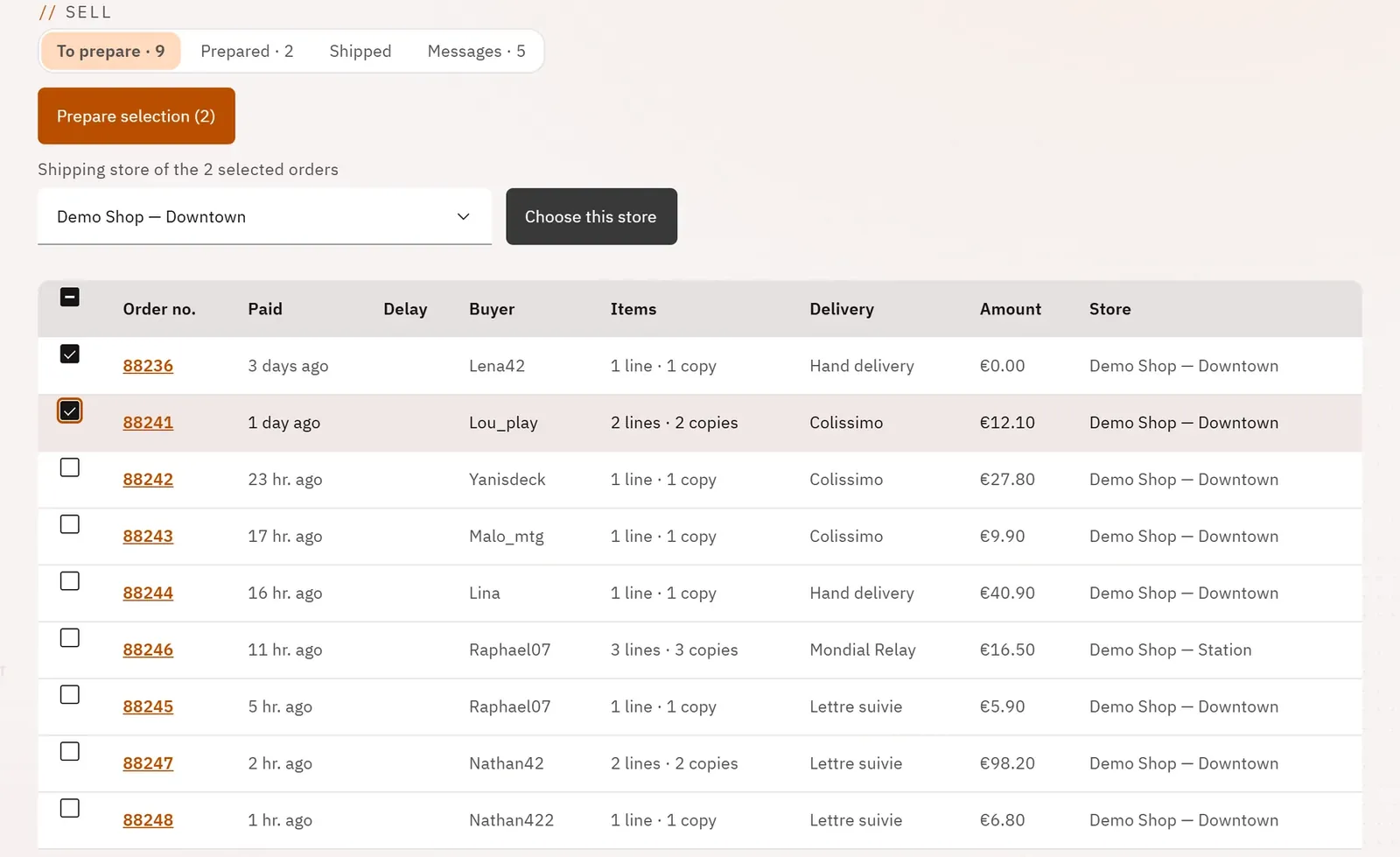
You handle online orders in order of urgency, from preparation to shipping. Late orders move to the top, and you keep track of the ones that have left.
 1234
- 1To prepare, with its counter
- 2Prepare the selection
- 3The shipping store
- 4The delay
What you can do
- Switch between “To prepare”, “Prepared”, “Shipped” and “Messages”, each with its counter.
- See for each order: number, payment date, delay, buyer, items, delivery method, amount, store.
- Tick up to 50 orders and prepare them together.
- Choose the store the selected orders ship from, when the shop has several.
- In “Prepared”: ship the selection, or prepare it again.
- In “Shipped”: the orders sent in the last 30 days, with their tracking and any disputes.
Step by step
- Open Orders.
- Tick the orders to prepare.
- If you have several stores, choose the shipping store, then Choose this store.
- Click Prepare selection.