
Events
The events calendar
pro.pyryx.com/evenementsSee this screen in the demo
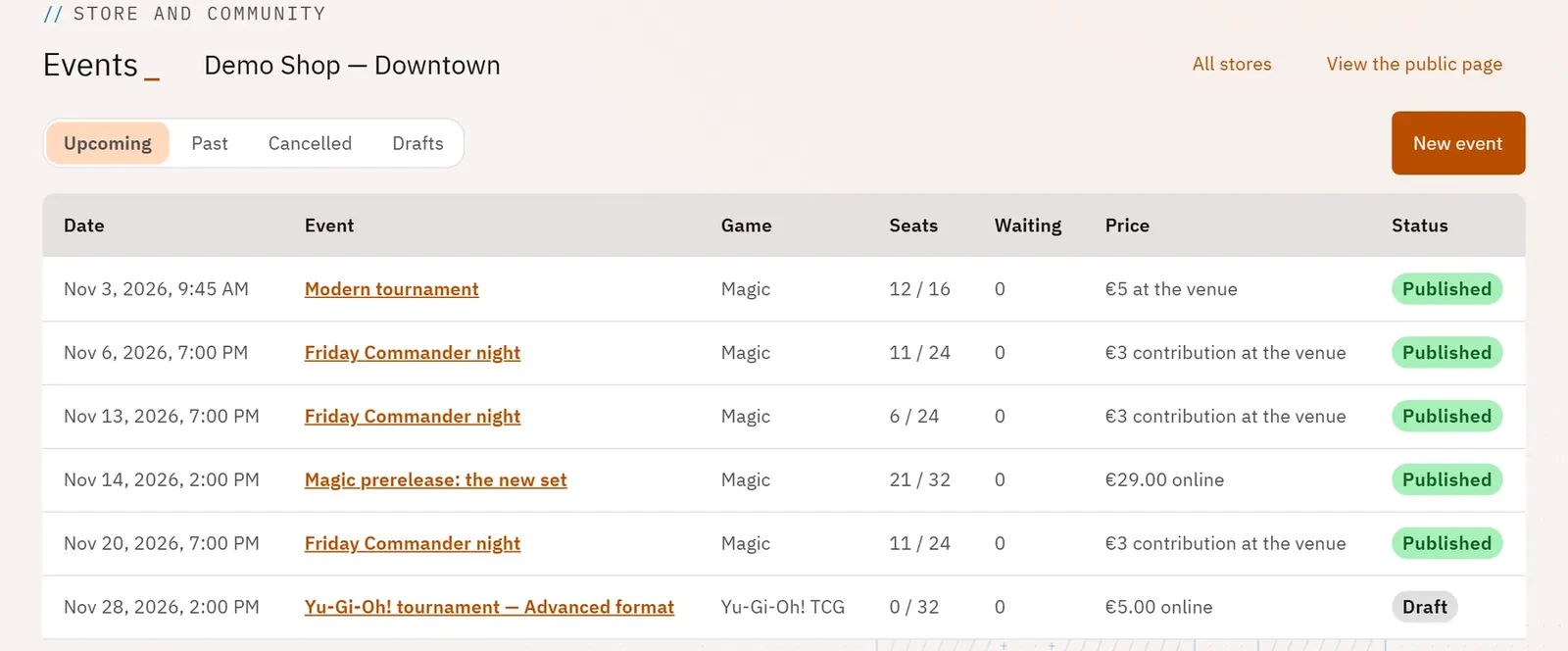
Keep your store’s calendar: game nights, prereleases, leagues. See at a glance how full each date is and what is still in draft.
 1234
- 1Views: Upcoming, Past, Cancelled, Drafts
- 2Create an event
- 3A paid online event
- 4The store’s public page
What you can do
- Four views: Upcoming, Past, Cancelled, Drafts.
- For each event: the date, the game, the seats taken, the waiting list, the price and the status.
- The price is spelled out: “Free”, “… online” or “… at the venue”.
- A link to the store’s public page, as your players see it.
Step by step
- Open Events in the menu.
- If you have several stores, choose one (for example Events of Demo Shop — Downtown) or set the Store selector in the header.
- Stay on Upcoming, or switch to Past, Cancelled or Drafts.
- Tap an event to open its page, or New event to create one.