
Stock and listings
Price tracking
pro.pyryx.com/stock/prixSee this screen in the demo
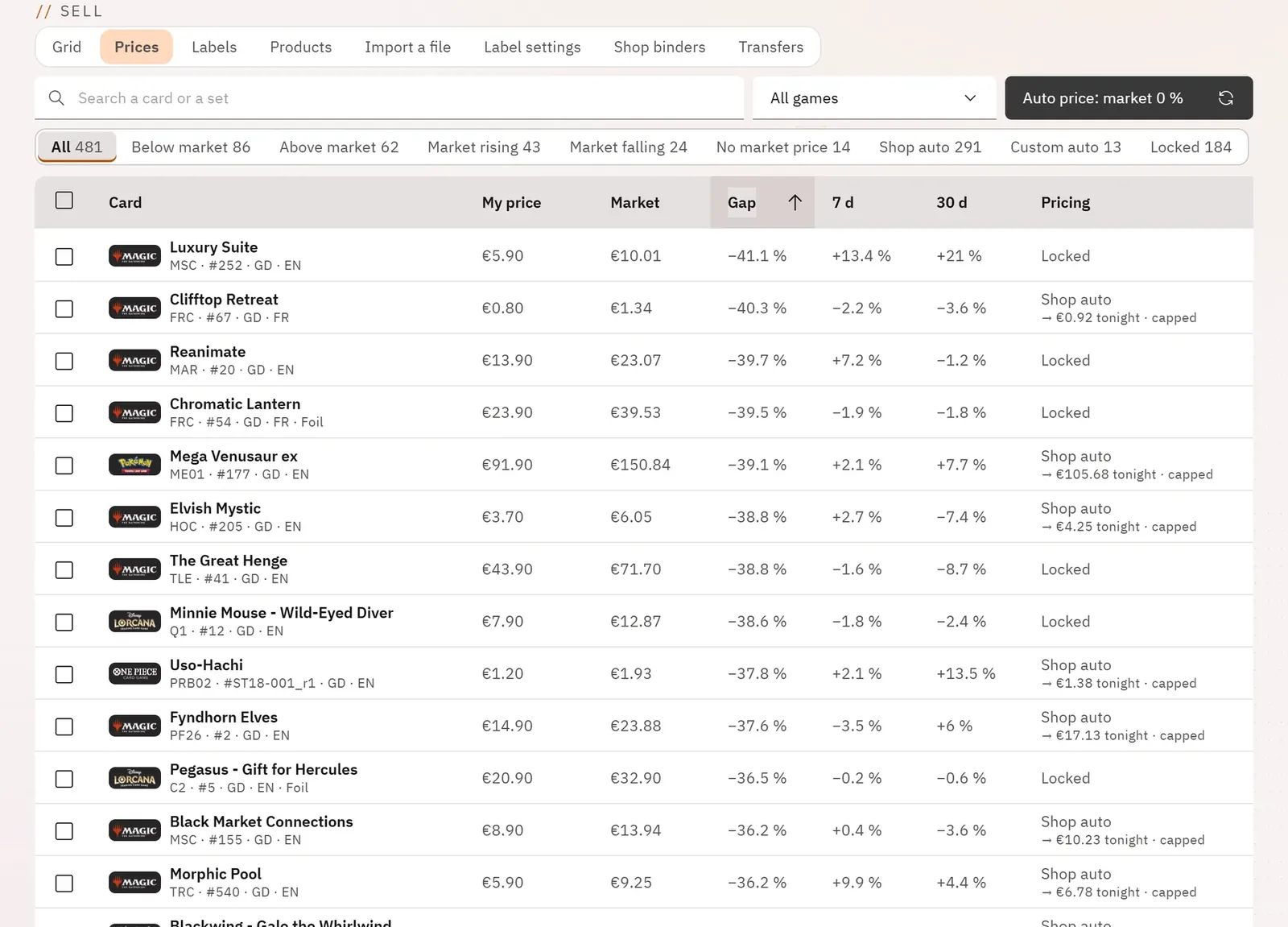
You know which cards you are selling below or above the market, and which are rising or falling. You correct them in a few actions: lock a price, unlock it, or hand it over to the auto price.
 1234
- 1The shop’s auto price
- 2The views: below market, rising…
- 3The gap to the market price
- 4How each price is tracked
What you can do
- Search for a card or a set, choose a game, sort by any column.
- Show the cards below the market price, above it, rising, falling, without a market price, following the shop’s auto price, a custom auto price, or locked.
- See for each card: your price, the market price, the gap, the trend over 7 and 30 days, the tracking mode and the price planned for tonight.
- Select a page or all the cards in a view, then lock, unlock or set their auto price.
- Open a card’s history: the curve of your price and of the market price, each night’s readings, the automatic changes, and the link to its market in Card valuation.
Step by step
- Open the Prices tab.
- Click the Below market view.
- Sort by the Gap column.
- Tick the cards, then Auto price… so that they follow the market price, or Lock price to keep them as they are.